What to Do If Your Laptop Is Stolen: Step-by-Step Guide 2026
In this complete 2026 guide, you’ll learn the exact steps to take right now: how to lock your accounts, how to track a stolen laptop, whether you can track it when it’s turned off, how to remotely wipe your data, and what usually happens to stolen laptops. We also cover special advice for work laptops and practical prevention tips so it doesn’t happen again.
Table of Contents
- Immediate Actions: What to Do Right Now
- How to Track Your Stolen Laptop
- Can You Track a Laptop When It’s Turned Off?
- Third-party Tracking Software
- Protect Your Data: Remote Wipe & Delete Information
- What Usually Happens to Stolen Laptops
- What to Do If Your Work Laptop Was Stolen
- How to Prevent Laptop Theft in the Future
- Frequently Asked Questions
A new report from the National Cyber Forensic Tracking Laboratory has revealed that laptop thefts have increased by over 50% in the past year. This is despite awareness campaigns and the introduction of more stringent security features in laptops. So what should you do if your laptop has been snatched? Here’s what experts say.
According to NCFTL, at least 17,000 laptops were stolen in New York alone last year. That figure has risen to 26,500 in just 15 months.
There are three key steps you need to take right now if your laptop has been snatched. Never attempt to recover the laptop yourself. We strongly advise you not to try and recover a thief’s laptop. Not only could you risk hospitalization or worse, but you can also be prosecuted in some areas. Instead contact the police at once.
Theft of laptops, tablets and other mobile computing platforms has increased by over 60% in the past five years. A new report from the National Cyber Forensic Tracking Laboratory has revealed that laptop thefts have increased by over 50% in the past year.17,000 laptops were reported stolen in New York in 2022, but that figure rose to 26,500 in the first 15 months of 2023.221,000 devices were recovered, an increase of 40% from the number recovered in 2022. Police in many areas now issue reports of stolen laptops and other mobile computing platforms (LMCPS) online, making it easier for the public to stay informed and avoid using stolen devices.
Immediate Actions: What to Do Right Now
In the event of a laptop theft, you need to take immediate actions to prevent your personal information from being compromised.
- Change any of the passwords that were stored on the stolen device. You should also change any weak passwords you’ve been using.
- Use a password manager to generate stronger and more secure passwords. We recommend LastPass.
- Lock your accounts (Google, Microsoft, Apple ID) to prevent further data loss.
- File a police report. Police reports are now available online in most jurisdictions.
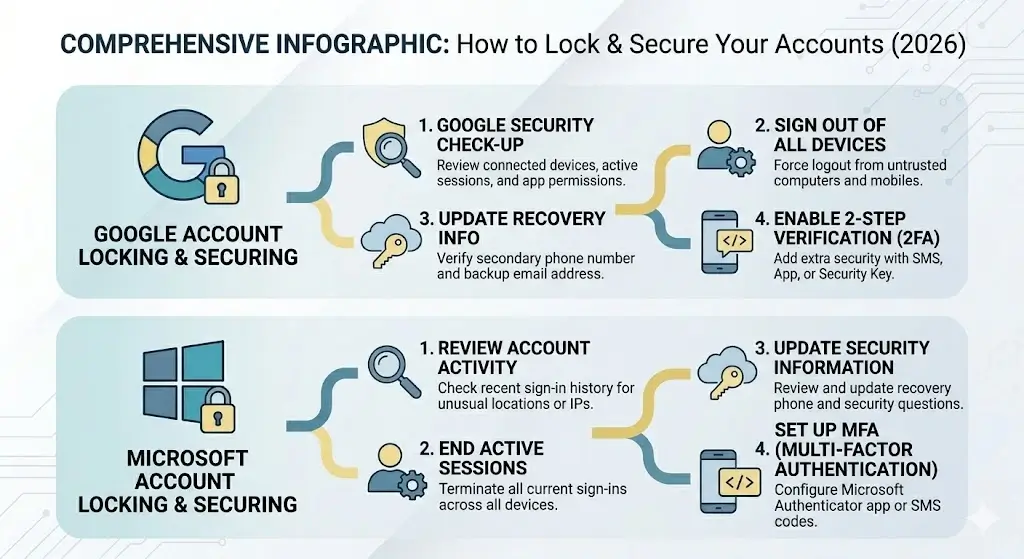
fig.1. How to lock Google and Microsoft Accounts
How to Track Your Stolen Laptop
Using built-in tools: Find My Device (Windows), Find My (Mac)
If your laptop has a modern enough processor and OS and is connected to the internet, you can use built-in tools to track it. On your Mac, go to the Find My page and click the laptop section to see its approximate location. On Windows 11, open Find My Device and click your laptop to get its approximate location and location history. There's also an open-source project called Jailbreak My Laptop, which aims to create a DIY version of Find My functionality for non-Apple laptops. At the time of writing, it's still in the alpha stage, but it can track an Asus ROG Swift OLED HF laptop.
You can also set up geofencing so that an alert is sent every time the laptop leaves or enters a specific area. These tools are free but only work if the laptop is registered and online.
Can you track a laptop when it's turned off?
If your laptop is both stolen and switched off, and you haven’t enabled hardware theft protection, then you won’t be able to track it using Microsoft or Apple tools.
As with many of the best security tools, features such as remote laptop lock and wipe, and geolocation tracking are only available when your laptop is switched on. Fortunately, there are ways to regain control of your laptop once it has been stolen or lost.
One of the simplest methods is to use one of the best mobile phone signals apps to track your laptop’s location. Many of these apps also allow you to remotely lock and erase any data stored on your stolen laptop, giving you some measure of control over your data and a sense of closure. However, to use this method, you must have saved the phone number or IMEI of your laptop’s mobile connection.
Alternatively, you could consider upgrading to one of the best laptop models with built-in GPS modules. This would allow you to turn on geolocation tracking and, once your laptop has been stolen, trace its movements on a map. Unfortunately, these types of laptops are more expensive to buy and replace.
In terms of remote locking, the best Apple Find My network can be used to remotely lock and erase data from your MacBook Pro, MacBook Air and MacBook. To do so, you must have the location of the device, and ensure that it is switched on and connected to the internet. Once connected to the Find My network, all of your data can be wiped and your laptop placed into ‘lost mode.’
Third-party tracking software (Prey, Absolute Computrace)
If you’re worried about theft, you may want to consider installing third-party laptop security software. Not only do they offer malware and ransomware protection, but they often include built-in tracking.
| Feature | Apple Find My (Mac) | Windows Find My Device | Prey | Absolute (Computrace / Persistence) |
|---|---|---|---|---|
| Platform | Apple devices only (Mac, iPhone, iPad) | Windows devices only | Windows, macOS, Linux, Android | Mostly Windows (some Mac), enterprise-focused |
| Persistence (survives factory reset / OS reinstall) | No | No | No | Yes (BIOS/firmware level) |
| Tracking when device is OFF | Limited (last known location) | Very limited | No | Best (can activate on next boot) |
| Remote Lock | Yes | Yes | Yes | Yes |
| Remote Wipe / Data Erase | Yes | Yes | Yes | Yes |
| Screenshots & Webcam Photos | No | No | Yes | Limited |
| Geofencing & Alerts | Yes | Basic | Excellent | Yes |
| Recovery Service (human team) | No | No | No | Yes (Theft Recovery Team) |
| Pricing | Free | Free | Free plan + Paid plans (~$5–15/device/mo) | Paid (~$40–60/year per device) |
| Best For | Apple users | Casual Windows users | Individuals & small teams | Enterprises & high-value devices |
| Ease of Use | Excellent | Good | Very Good | Good (more complex) |
Protect Your Data: Remote Wipe & Delete Information
For Windows laptops, you can use Microsoft’s Find My Device tool to remotely lock and wipe your laptop if you set it up before the theft. For macOS laptops, you can use Apple’s Find My Mac feature to remotely lock and wipe the device.
If you don’t have these tools enabled, you can still protect your data by encrypting your operating system or using hard drive wipe tools.
How to remotely erase your laptop
- Windows: Use Find My Device (must be enabled before theft).
- macOS: Use Find My Mac via the Find My app or iCloud.com.
Even after a full wipe, some BIOS-level tracking tools like Absolute can still keep working. Another option is setting up cloud-based remote wipe with tools such as HP ProtectTools.
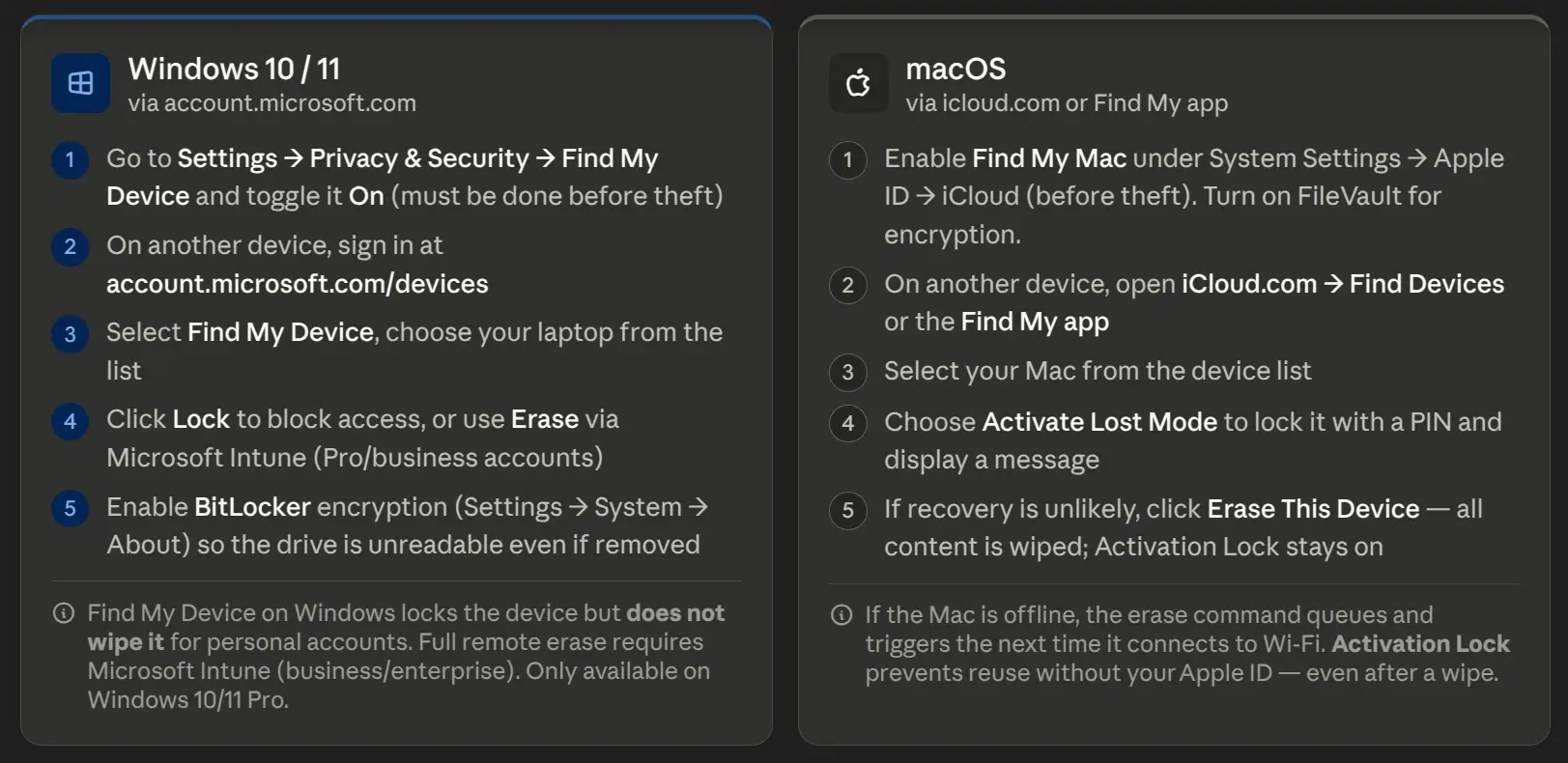
fig.2. How to perform remote wipe of Windows Laptop and macOS laptop
What Usually Happens to Stolen Laptops
Thieves want to get rid of the laptop as fast as they can. A lot of them end up being sold within just a few hours after the theft. According to the Prey Project, it often takes employees around 25 hours on average to even notice and report a missing work laptop.
Here’s what thieves commonly do with them:
- Sell it quickly to pawn shops, people on the street, or through online marketplaces.
- Take it apart and sell the pieces separately — things like RAM, SSD, screen, or battery.
- Sometimes they just wipe the drive or throw the laptop away.
It’s worth regularly checking online marketplaces using your laptop’s serial number (places like eBay, Craigslist, Facebook Marketplace, and others). And don’t forget to report that serial number to the police and any relevant online databases.
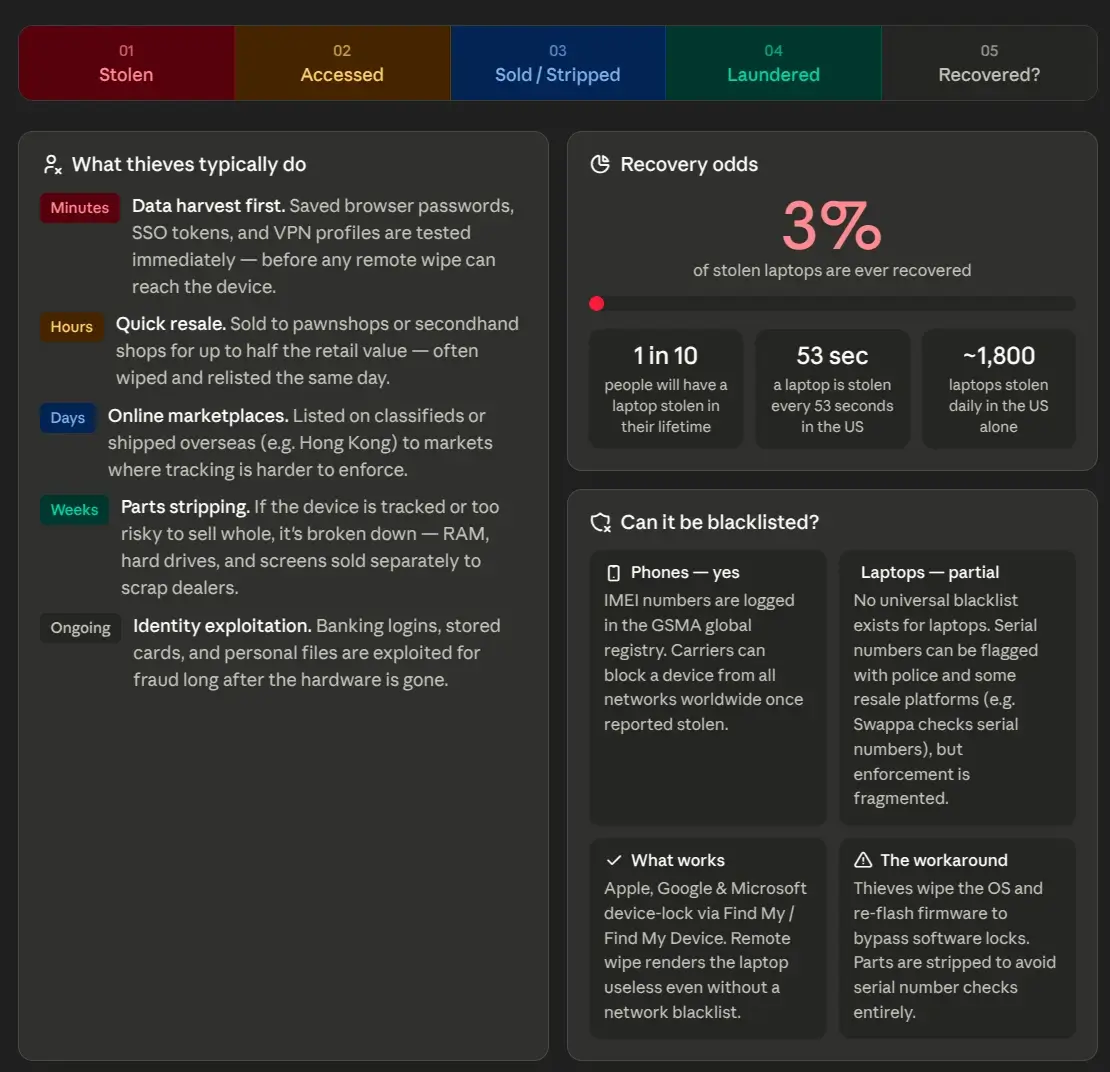
fig.3. Stolen laptop lifecycle
What to Do If Your Work / Company Laptop Was Stolen
Notify your employer immediately. Contact campus security or the police if it happened in a public place. Follow your company’s specific procedures for stolen laptops. Many workplaces have policies that may cover replacement costs, but you must follow the required steps, including filing a police report.
To mitigate any damage, you’ll want to take swift action. While a laptop can’t be replaced overnight, the data inside can expose your business to serious risks, including data breaches, lost productivity and customer trust issues.
Here’s how to respond when your workplace laptop has been stolen.
Notify your employer immediately.
If your laptop was stolen on company property, you likely have to follow your employer’s procedures. To minimize liability, many companies have strict expectations around data privacy and consequences for violating them.
The first step is to notify your boss right away. Some employers may have a “laptop policy” outlined in your employee handbook — if so, refer to that guide for next steps.
If your employer doesn’t have a policy on stolen laptops, here are some things to say in response to your stolen laptop:
“I’ve been using your company’s laptop, but it’s been stolen from me at work.”
“My name is [YOUR NAME], [COMPANY] employee number [EMPLOYEE NUMBER]. I need to speak to an administrator right away about my stolen laptop.”
“I haven’t had a chance to log out of my company account, and there’s sensitive information on my device that I need to access to complete my work day.”
“I need to speak with someone who can replace my laptop today so that I can continue working remotely until a new device is available.
Notify the police.
If you were on company property when your laptop was stolen, call the police. Even if you don’t think anyone will act on a theft report, filing a police report can help discourage opportunistic theft. Additionally, you may need a police report in addition to a stolen-laptop report when you file a claim with your insurance provider.
How to Prevent Laptop Theft in the Future
You’ll want to keep your data safe using strong security suites, proper encryption, a good antivirus, and maybe a VPN too. Make sure you keep a record of your laptop details — serial number, model, any stickers — in a safe place. It also helps to choose sturdy laptops with SSDs and always keep your software up to date.
Keep your laptop as far away from obvious places where it can be easily accessed. You don’t want to leave it sitting on a desk or table where a thief can walk by and grab it. Instead, invest in a laptop lock that can be attached to the underside of a desk or door. If you’re taking it outside, make sure to get one that can withstand the elements.
Get instant access to breaking news, the hottest reviews, great deals and helpful tips.
You can also purchase a laptop locker, which is similar to a bike lock but larger. They come in a variety of colors and styles and can even be attached to a keychain so you have easy access at all times. There are lockers that can be left unlocked with a code or the key fob option for those who prefer something physical.
Using a laptop locker is especially helpful if you plan on traveling. You don’t want to rely on a lock or cable to keep your laptop secure while you’re away from your home. A locker provides an extra layer of protection, and you can easily check on it remotely via a smartphone app.
My Own Story: The Day My Lenovo ThinkPad Was Stolen in Peru
My laptop was stolen in Peru in June 2021. It had a $400 scratchie on it and I thought it was safe until I checked eBay a couple of days later to see my Lenovo Thinkpad E6 on sale for $200. I contacted Amazon and they said they couldn't do anything but advised me to contact the police. I wrote down everything I could remember about where I bought my laptop second hand second hand from eBay garage sales and got in touch with the Peruvian police who put out a wanted poster and started investigating but made very little progress at all. Eventually they told me to pack up all my stuff and come over and file a police report myself because they couldn't do it remotely. I didn't want to go because it was Covid and Peru was off limits but I did send them some photos and a description and they still might have picked it up and not forgotten about it. I've never seen a laptop for sale as cheap as that but you'd be surprised. A laptop can cost you between $100 and $200 depending where you look. So I still had nearly $400 wiped away but at least someone will buy it and I'll get something back.I changed all my passwords straight away and now keep plenty of strong and up-to-date ones with LastPass. I'm also careful where I go with my own laptop now as I did with my phone when I used to travel all the time for work – it's a shame they don't make more robust travel-friendly laptops as some of the old Compaq slate laptops were pretty tough! I carry a rucksack with me though so if I ever did get caught in the rain or had to walk anywhere it would keep me safe. If you liked this article, check out our round-up of the best antivirus software or see our master guide on how to stay safe on the web.
Frequently Asked Questions
Can a stolen laptop be tracked after a factory reset?
Usually not with standard tools like Find My Device or Find My Mac. However, enterprise-grade solutions like Absolute Computrace work at the BIOS level and can survive factory resets.
Can you track a laptop that is turned off?
Generally no. Most tracking tools require the laptop to be powered on and connected to the internet. Only a few advanced enterprise solutions have limited capability to track after reboot.
How often are stolen laptops recovered?
Recovery rates are quite low — typically under 10-15% according to various reports. The faster you act and report the theft, the better your chances.
What do thieves do with stolen laptops?
Most thieves sell them quickly to pawn shops, online, or part them out for components (RAM, SSD, screen, etc.).
Do I need a police report if my work laptop was stolen?
Yes. Most companies require a police report for insurance claims and internal procedures.
Can a stolen laptop be blacklisted?
Yes, especially if it has enterprise management or tracking software. Some services can also report the serial number to databases that pawn shops and resellers check.
Conclusion
The most important things to remember: Don’t attempt to confront or arrest the thief yourself. Contact your local police station immediately to report the theft. Keep your stolen laptop details recorded somewhere easy to access, and make sure you have a valid driver’s license or other ID on hand in case your laptop is recovered.